sample

The Future of Sampling

Transform the way you sample, with one legendary plugin to sync, chop and flip, isolate track stems, pitch shift, and time stretch in a snap.

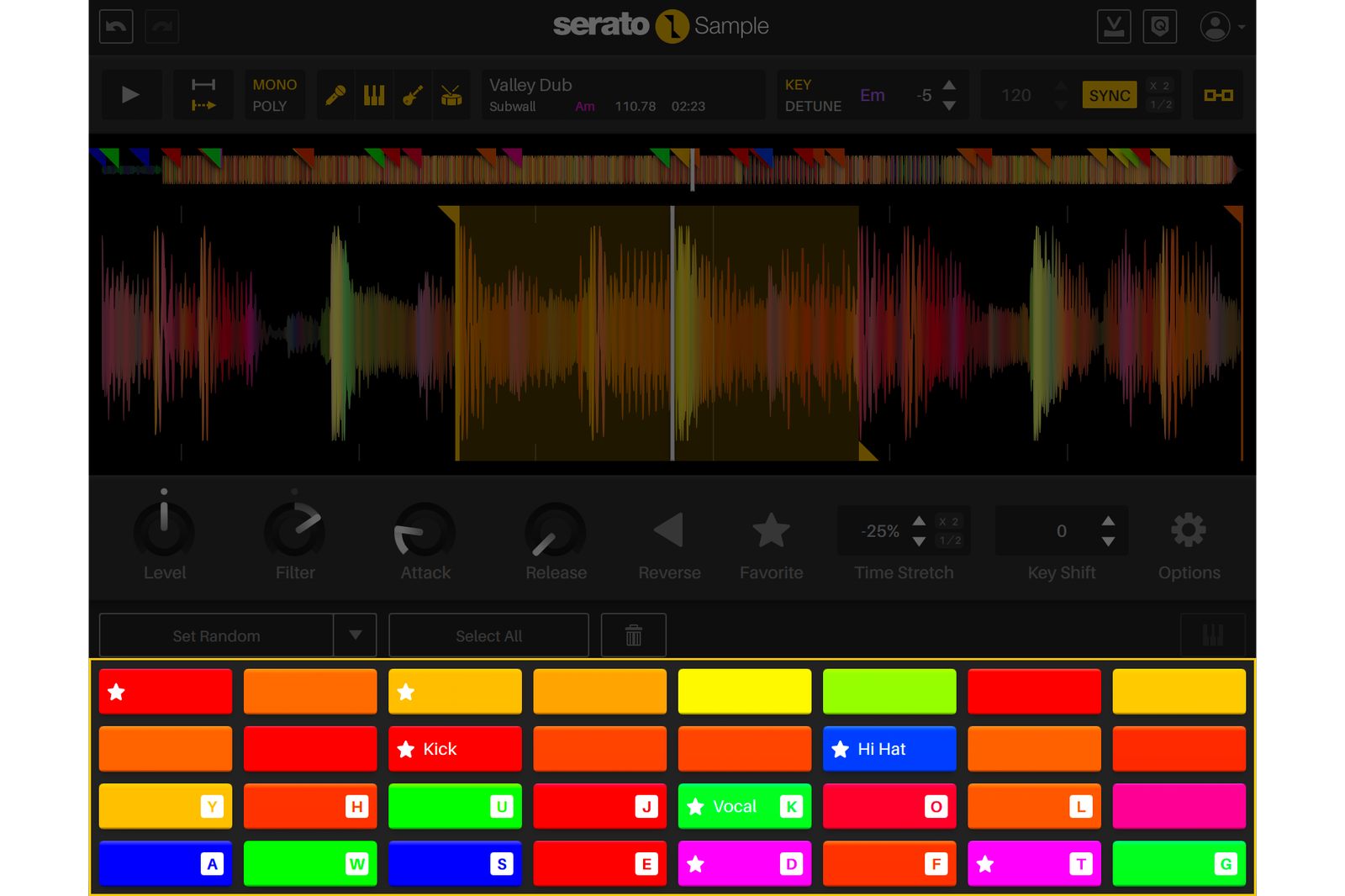
Serato Sample default view showing the sampler VST interface for chopping and flipping audio.
Serato Sample playback controls for BPM sync, key shift, and stem separation in the sampler plugin.
Serato Sample GUI showing color-coded waveforms in the best sampling software for quickly chopping with your eyes, ears, and hands.
Serato Sample interface showing 32 assignable pads in the sampler for triggering audio.
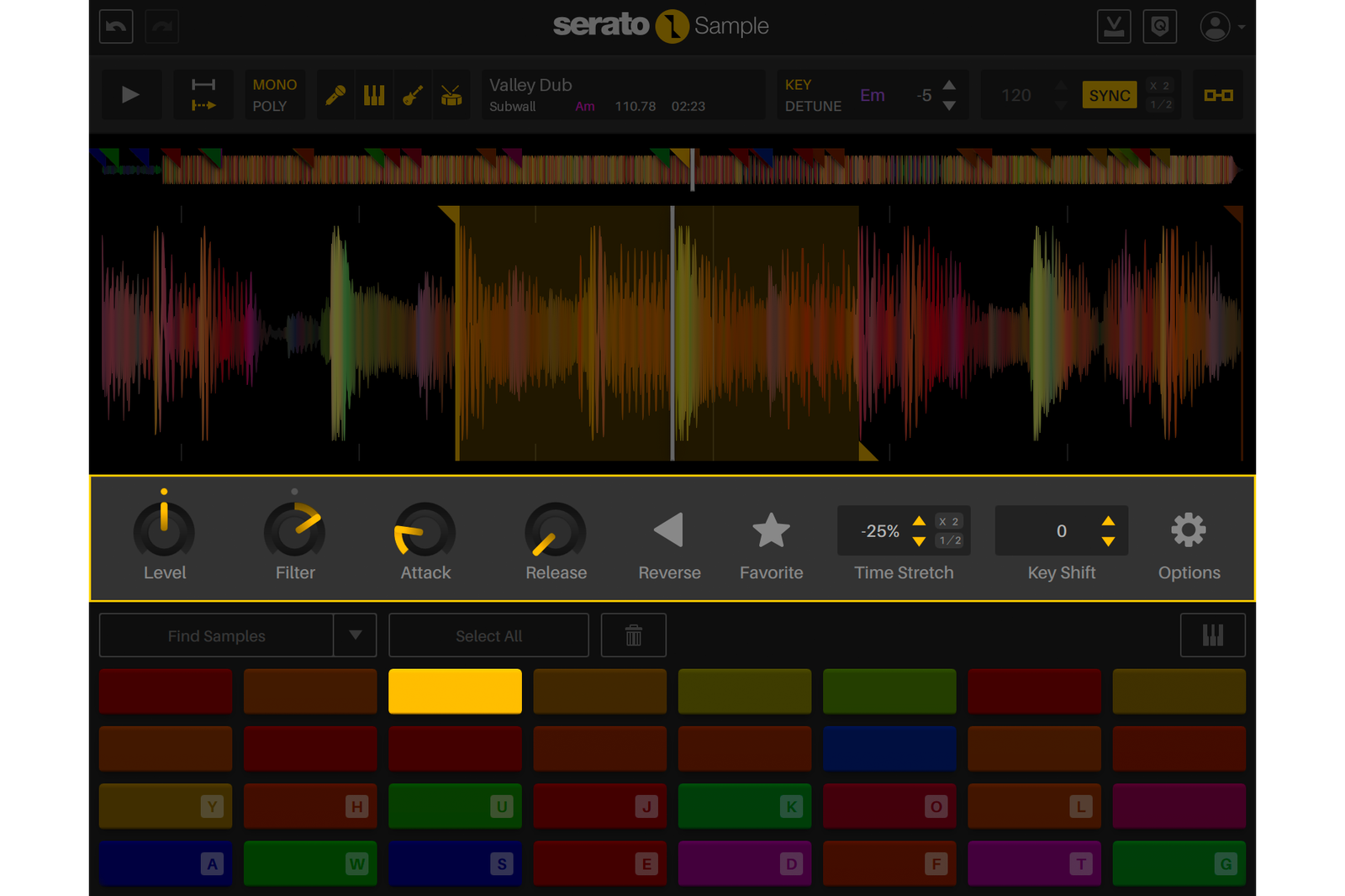
Serato Sample view showing per-pad parameter controls in the sampling software, letting you independently adjust the level, filter, attack, release, reverse, key/pitch and time/bpm of each chop in your sample.
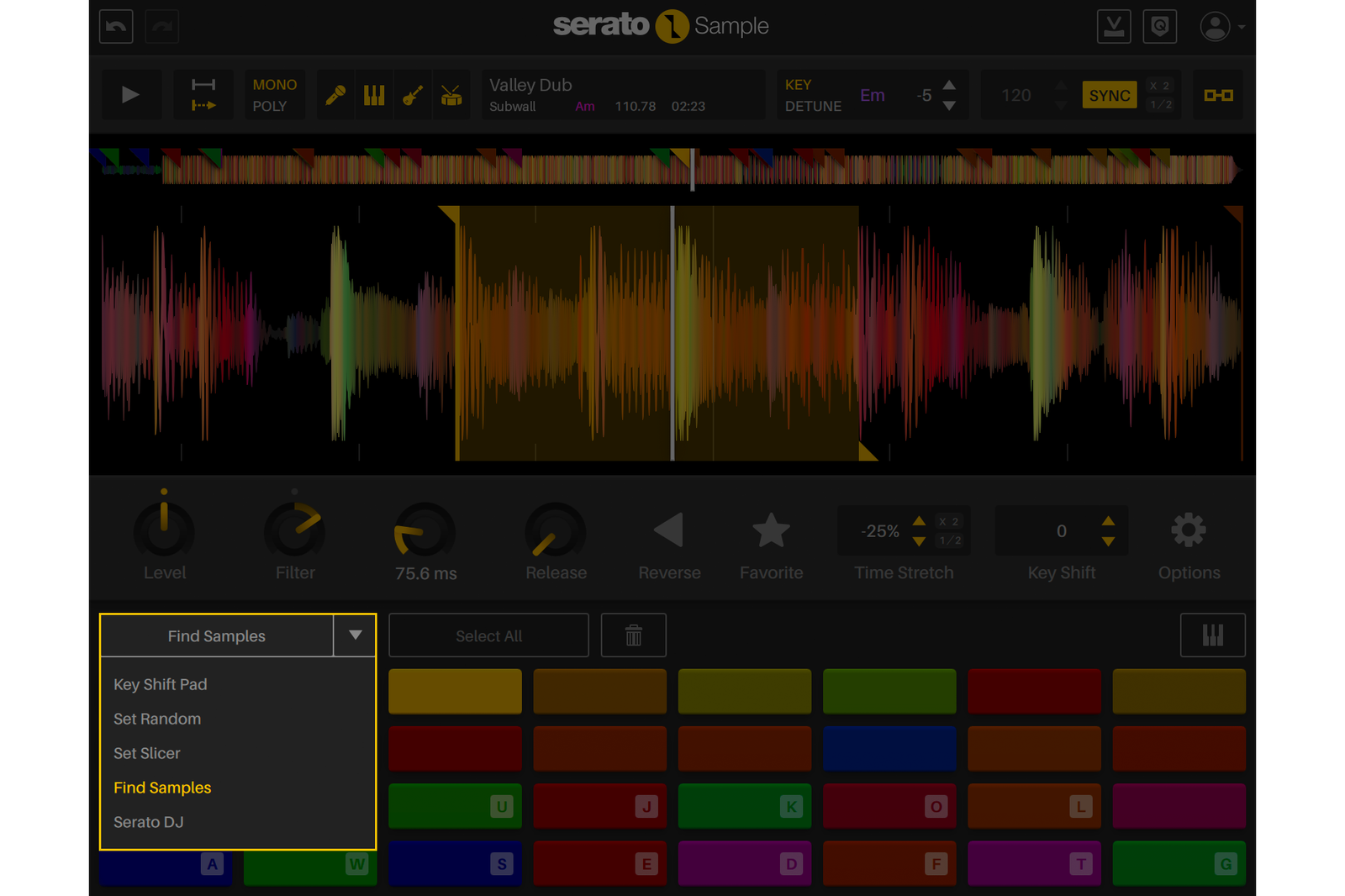
View Serato Sample's Autoset options, including Find Samples, Set Random, and Set Slicer — making it the best sampler plugin for fast and accurate sample chopping.
Arrow icon

Discover Sample

Arrow icon

Take a quick tour of Serato Sample

Arrow icon

Playback Controls

Arrow icon

Sync a sample to your project BPM, change key, separate audio stems, and select the playback and voicing modes.

Arrow icon

Colored Waveforms

Arrow icon

Easily set and adjust your Cue Points on a waveform with colors that represent the spectrum of audio frequencies.

Arrow icon

Sample Pads

Arrow icon

Assign up to 32 sample Cue Points to color-coded Pads. Triggered with your computer, MIDI hardware, or piano roll.

Arrow icon

Parameters

Arrow icon

Adjust the parameters for each Pad independently.

Arrow icon

Find Samples

Arrow icon

Get the best parts to sample with the ‘Find Samples’ algorithm, ‘Randomize’, or ‘Set Slicer’ at recurring beat or bar intervals.

Sampling Software to Ignite Your Creativity

Intuitive sampling features to bring your most ambitious musical ideas to life.

1. Sync It

Perfectly sync samples to your project’s BPM and Key.

2. Stem & Chop

Separate track stems to get isolated vocals, melodies, bass and drums, then use Find Samples to discover the best parts to sample.

3. Flip It

Adjust parameters and put your spin on it with Time Stretch, Key Shift, Reverse, or Keyboard Mode.

Multi-platinum producer Bryan Yepes creating with Serato Sample, the best sampler plugin for producers.

“Serato Sample helps me find a whole new world within a sound—something completely different to the original. It’s not easy to find a plugin like that.”

BRYAN YEPES

Multi-Platinum Producer & Songwriter

Stretch the Limits of Sampling

Create faster, sound better, and ignite your imagination through cutting-edge stem separation, a revolutionary workflow, and unrivaled audio quality.
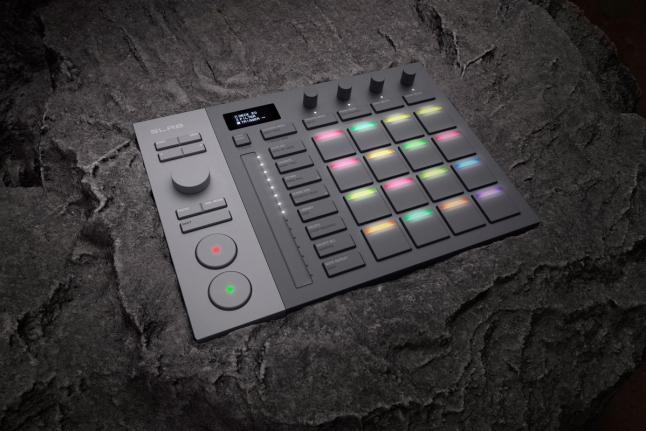
Serato SLAB, a Studio-native MIDI pad controller, key visual. By AlphaTheta & Serato.

NEW HARDWARE

SLAB—Control Sample With Serato’s First MIDI Pad Controller

SLAB gives you direct control of the Serato Sample plugin—from cue points and stem separation to pitch and time stretching. Scrub samples, chop sounds, and stay in flow with native integration or switch to custom MIDI mapping inside your DAW.

Create in Seconds

Supercharge your productivity with a sampling workflow that maximizes creativity.

  • Detect and sync your sample’s BPM and key to your project
  • Chop up, adjust, and isolate stems to get the best samples in a click
  • Trigger playback with MIDI hardware, keyboard, mouse, or piano roll

Sound Incredible

Showcase your sound through unmatched audio quality.

  • Legendary Serato pitch shifting and time stretching technology
  • Unrivaled stem separation audio quality
  • Beatgrids to sync unquantized samples to your project

Stand Out

Evolve your signature style with unique sound-design tools.

  • Unlock extraordinary new sounds with isolated stem combinations
  • Key shift, time stretch, and adjust individual playback parameters
  • Pitch and play your samples like an instrument with Keyboard Mode

Unlock Your Sound

Discover infinite creative possibilities with Serato Stems.

  • Separate your sample’s audio stems with incredible sound quality
  • Access acapella, drums, melodies and basslines in real time
  • Chop and flip stems to create a sound that’s uniquely yours

Overview video

See Serato Sample in Action

DJ Spinna demonstrating Serato Sample, the sampling software for chopping and flipping tracks.2:10

Additional features

Everything You Need from a Powerful Sampler Plugin

Stem Separation

Unlock the acapella, melody, bassline and drum stems from a track in real time, fine-tune stems levels—or automate it to revolutionize your sampling possibilities.
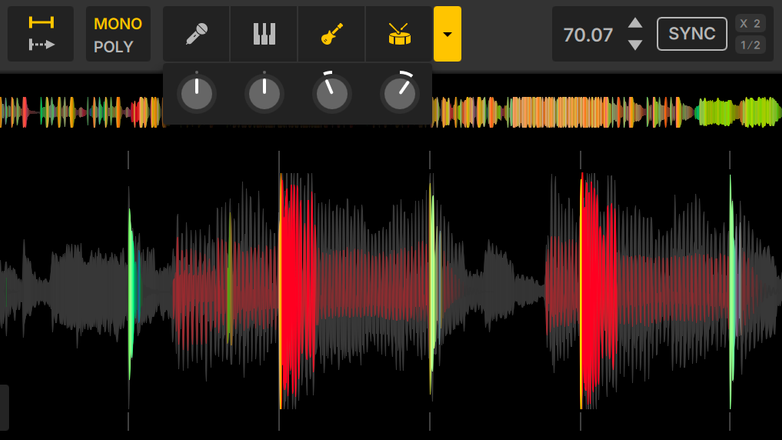
Serato Sample GUI showing real-time stem separation in the best sampling software.

Cue Points

Easily set, adjust, and trigger up to 32 different Cue Points throughout your sample with the touch of a Pad.

Serato Sample GUI showing how to set a sample chop's start and end points by dragging Cue handles in the sampler plugin's waveform.

Key Shifting

Change the pitch of your entire sample without affecting its tempo. Shift in semitones with Key, or micro-tonally using Detune.

Serato Sample GUI showing key shifting controls for pitch changes in the sampler plugin.

BPM Sync

Change the tempo of your sample or automatically sync it to your project’s BPM. Enable whether to link the tempo and pitch, or adjust independently.

Serato Sample GUI showing how to match your audio to your project tempo using BPM sync controls in the sampling software.

Sample Analysis

Get your sample’s track information at a glance — including key, BPM, and duration.

Serato Sample GUI analysing key, BPM, and song duration in the sampling software.

Time Stretching

Stretch or contract the playback speed of individual pads, while preserving the original pitch and audio quality.

Serato Sample GUI showing time stretching controls on a Cue Point's playback speed in the sampler plugin.

Per Pad Parameters

Adjust individual pad’s pitch, speed, and audio parameters — including level, filter, attack, release, and reverse.
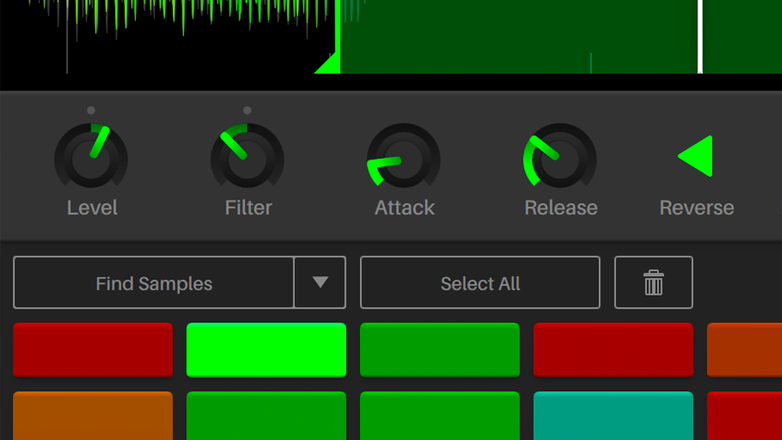
Serato Sample GUI showing individual pad's level, filter, attack, and release controls in the sampler plugin.

Find Samples

Analyze the waveform to load up your Pads with all the best places to set Cue Points.
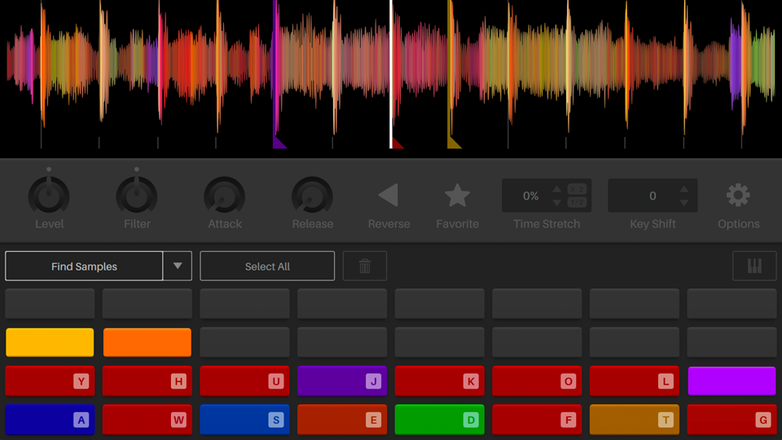
Serato Sample GUI showing why the Find Samples Autoset tool makes it best sampling software for quick, intuitive chopping.

Set Random

Roll the dice and chop your sample up randomly for sudden inspiration.
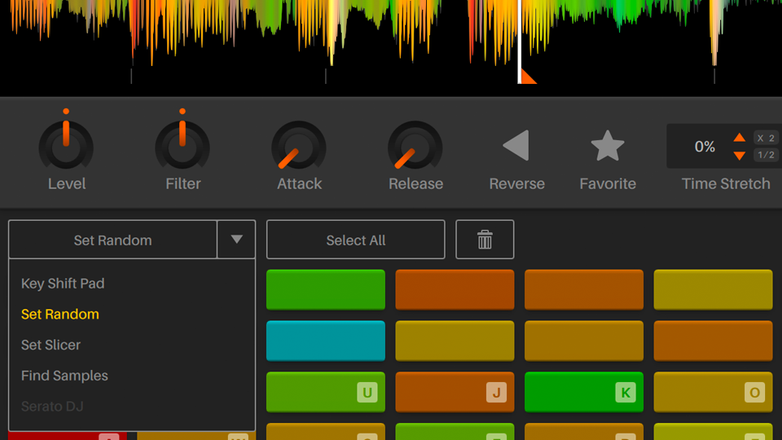
Serato Sample GUI showing the Set Random Autoset tool for chopping samples in the sampler plugin.

Set Slicer

Chop your sample up at recurring beat or bar intervals to get the perfect one shots quickly.

Serato Sample GUI showing the Set Slicer Autoset tool for fast chopping at various beat or bar intervals in the sampling software.

Colored Waveforms

See the frequencies of all audio across the full-color spectrum for faster sample chopping. Low reds to high blue frequencies.

Serato Sample GUI showing color-coded frequency waveforms in the sampler plugin for faster chopping.

Keyboard Mode

Play any sample like an instrument by pitching it over the notes of a keyboard.
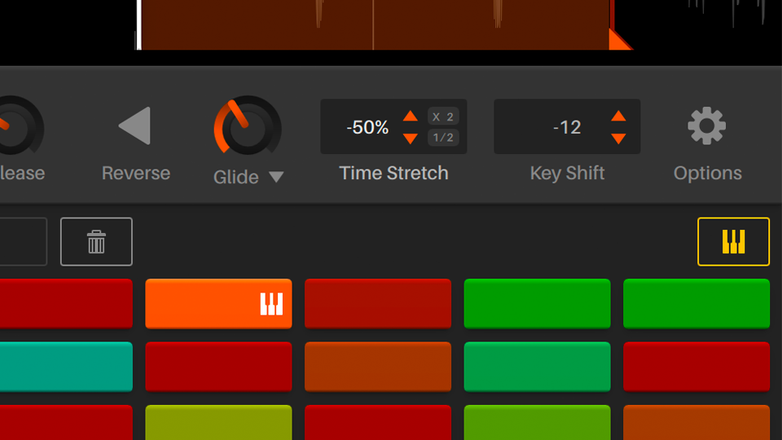
Serato Sample GUI showing Keyboard Mode chromatically pitching a sample chop to play like an instrument in the sampler plugin.

Beat Grids

Quantize even the most warped sample by placing the first beat of every bar.
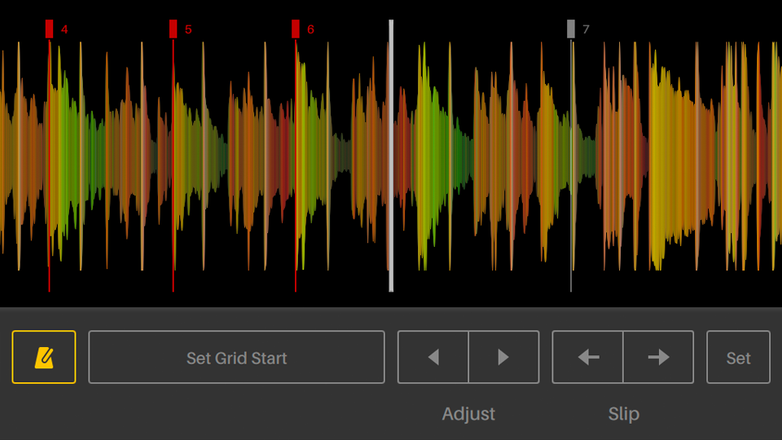
Serato Sample GUI showing Beat Grid controls to set the down beat and quantize drifting rhythms in the sampling software.

Hold / Trigger Playback

Determine whether a sample’s playback is continuous, or only as long you hold down a pad.

Hold / Trigger Playback icon

Mono / Poly Voicing

Select the voice mode for whether only one or multiple pads can play simultaneously.

Mono / Poly Voicing icon

Per Pad Output Routing

Send individual pads to different channels for distinct FX, EQ and mixing treatments.

Per Pad Output Routing icon

Serato DJ Cue Points

Load the Cue Points from Serato DJ into your sample.

Serato DJ Cue Points icon

Velocity Mode

Trigger your samples with your MIDI hardware, with touch-sensitive velocity.

Velocity Mode icon

Pad Quantize

When active, set your Cue Points to lock perfectly on the beat.

Pad Quantize icon

Pad Naming

Favorite and name your pads for quick reference.

Pad Naming icon

Key Shift Pad

Pitch a sample chop across the octaves, assigning semitones to your pads.

Scenes and Key Shift Pad icon

Discover more

Expand Your Creative Palette

FAQs

Plus iconMinus icon

What is Serato Sample?

Serato Sample is a powerful, high-quality audio sampler plugin used by music producers to quickly sync, chop, pitch-shift, time-stretch, separate stems, and manipulate samples. Built on Serato's legendary Pitch ’n Time, Stems and sample chopping algorithms, the VST, AU, and AAX plugin integrates into DAWs supporting these formats, including Serato Studio, Logic Pro, Ableton Live, Pro Tools, FL Studio, and Maschine.

Plus iconMinus icon

Which DAWs does Serato Sample work with?

Available in VST, AU and AAX formats, Serato Sample can be used in any plugin-supporting DAW, with official support in Serato Studio, Logic Pro, Ableton Live, Pro Tools, FL Studio, and Maschine.

To get set up and started with Serato Sample in your DAW, make sure you first check out the recommended system requirements for macOS and Windows and watch the tutorial videos.

Plus iconMinus icon

What are my options for buying Serato Sample?

You can get Serato Sample either through a monthly Producer Suite subscription or as a one-time purchase. See the Serato Sample pricing page for more details.

Plus iconMinus icon

Can I try Serato Sample for free?

Yes! Serato Sample offers a free 30-day trial, fully featured, with no credit card required.

Plus iconMinus icon

Does Serato Sample support hardware controllers?

Serato Sample supports any MIDI hardware. To create the best sampling software experience use your DAW’s MIDI Learn function to map your pads, knobs, keys, and faders or any other assignable MIDI control to Serato Sample.

Check out these tutorials to learn how to set up Sample with general MIDI hardware, NI Maschine, and Ableton Push.

For plug and play, SLAB is Sample’s first native MIDI pad controller, letting you to switch between custom DAW mapping and native control of Serato Sample.

Plus iconMinus icon

Can I use Serato Sample if I'm new to music production?

Serato Sample is designed for producers of all skill levels, from new to experienced.

With automatic project BPM syncing, transparent pitch and time stretching, fast sample chopping, and real-time stem separation, Sample’s workflow is intuitive to learn and powerful to use for anyone.

Watch the tutorials to learn how to sample songs, chop samples, and get the most out of Serato Sample.

Plus iconMinus icon

What are the system requirements to run Serato Sample?

To ensure you can run the latest version of Serato Sample in your DAW smoothly, view the recommended system requirements and macOS and Windows compatibility details on the Downloads page.

Plus iconMinus icon

How does Serato Sample work?

Serato Sample is a VST/AU/AAX plugin that essentially works as a virtual instrument in your DAW. Load your audio, chop the sample by placing Cue Points throughout the waveform, and then trigger the pads using your MIDI hardware or by painting them into your DAW’s piano roll.

Plus iconMinus icon

What makes Serato Sample the best sampler for you?

If you like the flow of a vintage drum machine with all the power of the best sampling software in your DAW, then Serato Sample is for you. Level up your current sampler and stem plugins with Sample’s clean 32-pad workflow, loaded with pro-grade features, including automatic project key and BPM syncing, intuitive sample slicing, hands-on triggering, frequency-colored waveforms, real-time stem isolation, transparent pitch shifting and time stretching, and more.

Download, start a free 30-day trial, or buy Serato Sample now.

sample logo

Transform the Way You Sample

Start a free trial